
A Beelink EQ14 with an Intel N150 processor, 16GB of RAM, and a 500GB NVMe drew about 6 watts at idle in my testing closet last month. That works out to roughly $8 a year in electricity. On that single $190 box, a friend now runs Jellyfin for his family’s media library, Immich for 40,000 photos, Vaultwarden for password sync across six people, Home Assistant for his smart-home gear, Pi-hole for network-wide ad blocking, and a Tailscale exit node so his teenager’s iPad has DNS filtering on the school bus. Total monthly cost to replace Google Photos, 1Password Family, Plex Pass, and a chunk of his Google Drive: zero.
This is what self-hosting looks like in 2026. The hardware is finally cheap enough, the software is finally polished enough, and the privacy economics finally tilt against the cloud subscription stack most households accumulated between 2018 and 2024. The question isn’t whether you can run your digital life on a mini PC under your TV. The question is which mini PC, which services, and what fails when your power flickers at 3 a.m.
What changed that made this realistic
Three things converged. Intel’s N150 chip — the heart of the Beelink EQ14 and a wave of similar boxes — pulls 6W TDP at a base spec but turbos to 3.6 GHz when needed, with a 24-EU integrated GPU that handles Jellyfin hardware transcoding through Quick Sync. That combination didn’t exist at this price point three years ago. AMD’s Ryzen 9 7940HS in the Minisforum UM790 Pro ($380–500) gives you 8 cores and 16 threads in a fanless-adjacent box that idles around 12W — enough to run Proxmox with four VMs and a Plex transcode happening simultaneously without breaking a sweat.
The software side caught up faster than most people noticed. Immich reached feature parity with Google Photos for face recognition and natural-language search in 2024 and has held it since. Jellyfin 10.11.x closed the transcoding and metadata gap with Plex while staying fully open source. Vaultwarden runs the entire Bitwarden API in roughly 50MB of RAM. Tailscale made remote access trivial without port forwarding, and Home Assistant became the default smart-home hub for anyone who’s ever been burned by a vendor pulling cloud support on their light bulbs.
And the cloud math got worse. iCloud+ 2TB, Google One 2TB, Dropbox Plus, Plex Pass, 1Password Family, and a couple of streaming services land most households at $40–80 a month in recurring software subscriptions. That’s $480–960 a year, before any of it ever syncs your photos to a server you control.
The $500 budget, allocated honestly
The sticker price on the box is not the only number. A realistic build budget, including the bits people forget:
The hardware is one-time. The recurring cost — power plus offsite backup — runs about $25–30 a year. Compared to the cloud subscription stack it replaces, payback is typically under nine months.
If you need more headroom from day one, the Minisforum UM790 Pro at the upper end of the $500 budget gets you 8 cores, 32GB of DDR5, dual USB4 ports, and enough thermal capacity to run several VMs without breathing hard. Pick that one if you know you’ll want Proxmox with multiple isolated VMs for tinkering. Pick the EQ14 if you want a quiet appliance that just runs.
What you can actually run on this hardware
The honest answer depends on whether you’re picking the N150 entry box or the Ryzen 9 mid-tier. Here’s how the realistic service stack maps to each tier:
A few notes on the stack itself. Immich is the headline migration target for most people — it runs face recognition, smart search, and timeline browsing entirely on your hardware, with mobile apps that auto-back-up from iOS and Android the same way Google Photos does. The N150’s 24-EU iGPU handles ML inference for face clustering on a small library; for 100,000+ photos, expect the initial scan to take a day or two and then run incrementally. Nextcloud All-in-One consolidates files, calendar, contacts, and Office editing into a single Docker container that updates atomically. Vaultwarden is the unofficial Bitwarden API reimplementation in Rust — fully compatible with the official Bitwarden mobile and browser apps, so your family uses the same UX they would on the paid product, just pointed at your server.
How the architecture actually fits together
The mental model that makes this work is layered: the box runs Proxmox VE 8.x as the bare-metal host, services run as LXC containers (cheap, fast) or full VMs (isolated, slower), reverse proxy sits in front of everything, and remote access happens through Tailscale instead of port forwarding.
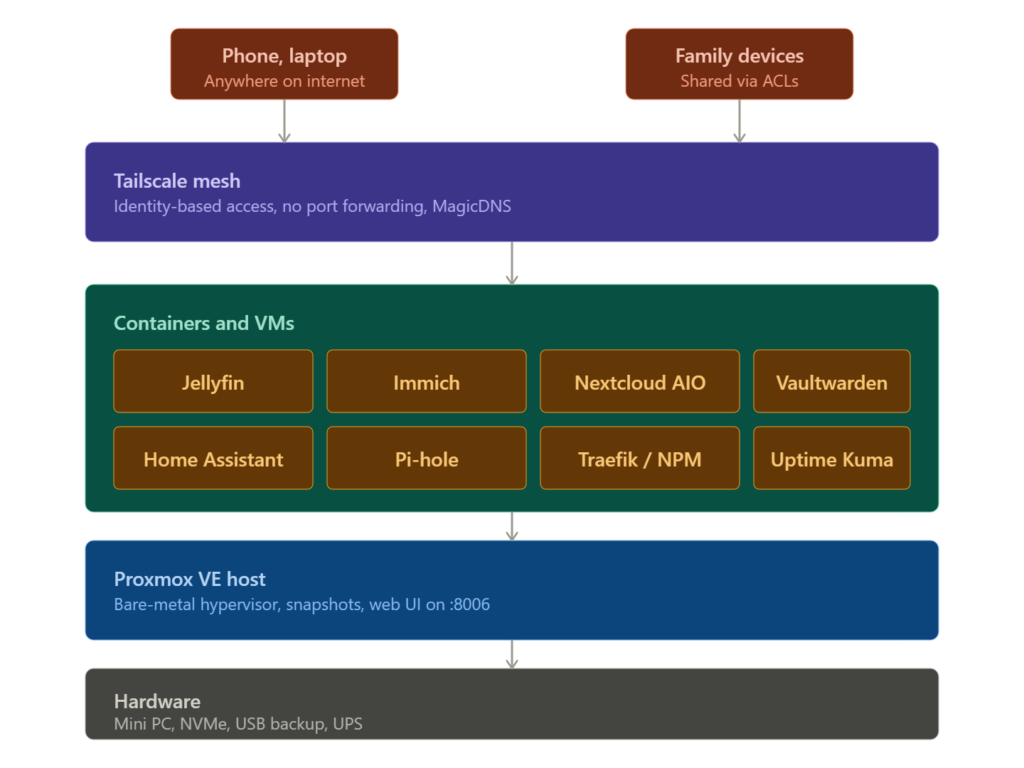
A handful of choices in this layout matter more than they look. Running Proxmox VE instead of plain Docker on the metal gives you snapshots — before you upgrade Nextcloud, you snap the container, do the upgrade, and if it breaks you roll back in under a minute. That single capability is why most serious self-hosters stopped running Docker on bare Ubuntu years ago.
The Tailscale layer is the one most newcomers underestimate. With Tailscale on every device — phones, laptops, family iPads — you don’t open any ports on your router. Your services are only reachable from authenticated devices on your tailnet. That eliminates roughly 95% of the realistic attack surface a self-hosted server faces. Tailscale’s free tier covers up to 100 devices and 3 users, which is enough for most households without paying anything. If you object to depending on a third-party coordination server, Headscale is the open-source self-hosted control plane with the same client compatibility.
Self-hosting versus the cloud, by category
The replacement story varies by service. Some self-hosted alternatives are now strictly better than what they replace; others are good enough; a couple are still rougher than the polished commercial product.
The headline: photos, passwords, smart home, and most household file sync are now genuine drop-in replacements. Media is fine if you mostly watch your own library on phones, tablets, and laptops; if your viewing happens entirely on smart TVs, Plex’s app ecosystem is still meaningfully ahead. Email remains the one category where self-hosting is more trouble than it’s worth — Gmail and Outlook will quietly send your outbound mail to spam folders for reasons that are difficult to debug, and the convenience gap with Fastmail or Proton Mail (which are not Big Tech, and which are cheap) is small.
The security threat model that actually matters
Self-hosters lose data more often to mistakes than to attackers. Hardware fails, upgrades go sideways, a kid pulls a USB drive at the wrong moment. The practical security stance is:
Don’t expose anything to the public internet. Tailscale or WireGuard, period. The vast majority of headline-grabbing self-hosting compromises trace back to someone port-forwarding 8080 to their Nextcloud and letting an unpatched CVE find them. If your services are only reachable from your tailnet, an n-day exploit in a self-hosted app is a slow-motion problem you can patch in your own time, not an emergency.
Run snapshots before upgrades. Proxmox makes this a one-click operation. The discipline of “snap, upgrade, test, keep or rollback” prevents the single most common cause of self-hosted services going dark: an auto-update that introduced a breaking config change at 4 a.m.
Back up to two places. Local snapshots cover “I broke it.” A weekly external USB drive copy covers “the SSD failed.” An encrypted offsite copy at Backblaze B2 or Storj covers “the house burned down.” Restic and Borg are the standard tools; both encrypt before upload, so the cloud provider only ever holds opaque ciphertext.
Set up Vaultwarden and 2FA before anything else. Your password manager is the recovery path for everything else, so it has to be solid. Take its database backup seriously and test that you can restore it.
The pitfalls nobody puts in the sales copy
Single-channel memory on the N150. Beelink ships the EQ14 with one DDR4 SO-DIMM in a single-channel configuration, which costs roughly 15-20% in memory bandwidth versus a properly populated dual-channel system. For most home-lab workloads this doesn’t matter; for transcoding and on-the-fly photo ML it sometimes does.
The included SSD is often M.2 SATA, not NVMe. The EQ14 ships with an M.2 SATA drive in some configurations despite having an NVMe slot available — performance is notably slower than the spec sheet implies. Plan to replace the boot drive with a proper PCIe 3.0 x4 NVMe unit on day one, or at least when you find time.
Power outages still ruin your day. A small UPS isn’t optional if your services include anything anyone in the household relies on. The mini PC will survive a brief outage on its own, but disk caches don’t always flush cleanly, and a corrupted Nextcloud database is a long evening you don’t want to have.
ISP CGNAT breaks port forwarding entirely. Increasingly, residential ISPs — particularly cellular 5G home internet, Starlink, and some fiber providers — don’t give you a public IP at all. This is precisely why Tailscale’s NAT traversal matters: it works regardless of CGNAT. Plain WireGuard requires a real public IP or a VPS relay.
The N150 is not enough for serious local LLM inference. Running a 7B-parameter model locally for assistant-style tasks needs the Ryzen-tier mid-range box at minimum, and even then you’re getting CPU-only inference that’s slow compared to anything with a real GPU. If local AI is core to your plan, budget separately for a GPU mini PC or accept that the cloud models stay in your stack.
FAQ
Will my electricity bill go up? A Beelink EQ14 running 24/7 at typical idle (around 6W) costs roughly $8 per year at U.S. average electricity rates. The Minisforum UM790 Pro runs $15-20 per year depending on load. The cost is functionally invisible.
What happens when I’m not home and the server reboots itself? Configure auto-start in Proxmox for your VMs and containers. They come back up on their own after a power restoration. Run Uptime Kuma to monitor your services and ping you on ntfy if anything stays down.
Do I need to know Linux? Not really. Proxmox has a polished web UI, and most services run as Docker Compose files you can copy from the project’s documentation. You’ll learn enough Linux to be dangerous within a few weeks, and the help is everywhere — r/selfhosted and r/homelab answer questions within hours.
Is this legal? Self-hosting your own services is fully legal everywhere. The grey area is media — Jellyfin is open-source software with no legal issue; the legality depends entirely on whether you have the rights to the files you’re streaming.
Where this leaves you
The self-hosting movement spent fifteen years being a hobby. In 2026 it’s a financially obvious decision for any household paying $30+ a month in cloud subscriptions, willing to spend a weekend setting up a small box, and uncomfortable with the slow-rolling enshittification of the consumer cloud. The hardware is cheap. The software is mature. The privacy story is real, not theoretical. And the failure modes are small enough that a careful first-time builder genuinely can run their family’s photos, files, passwords, and media on a $200 box behind their TV without it becoming a part-time job.
If you’ve been waiting for a moment, this is it. Buy an EQ14, an extra NVMe, a UPS, install Proxmox, and start with Vaultwarden and Immich. Add the rest as you outgrow the cloud subscriptions one by one. By next April, your monthly software bill is closer to zero than to fifty dollars, and your data lives in a closet you can point at.